Description
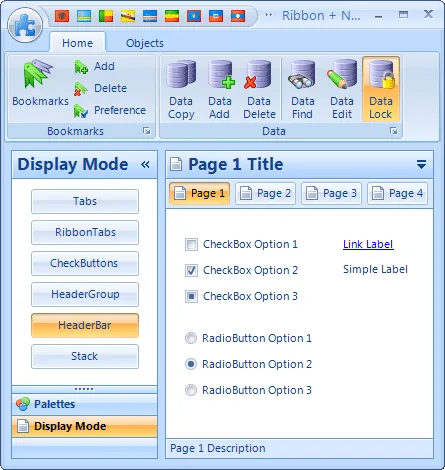
The Krypton Suite component is a very powerful package that includes various controls for C # .Net, VB.Net, WPF languages. These controls include Krypton Ribbon, Krypton Navigator, Krypton Docking and Krypton Workspace, which are not included in Visual Studio by default. You will be able to customize these controllers as you like and apply a lot of changes to them.
Features and Features of Krypton Suite:
- It has Krypton Ribbon which includes the following features:
- Quick Access Toolbar
- Contextual tabs
- KeyTips just like Office
- Automatic group resizing
- Rich design time support
- Supports Vista glass
- Embed custom control in the ribbon
- Rich ToolTip support
- It has Krypton Docking which includes the following features:
- Context Menus
- Custom Appearance
- Docked and AutoHidden
- Persistence Layout
- Floating Windows
- Prevent Docking
- It has Krypton Navigator which includes the following features:
- Alignment against any edge
- TabStrip style modes available
- Single line & Multiline tabs available
- Hide & Show individual pages
- Enable & Disable individual pages
- Events give developer full control over actions
- ToolTips support
- Popup pages
- It has Krypton Workspace which includes the following features:
- Drag Repositioning
- Cell Modes
- Cell Layout
Krypton Suite Component Tips:
- This version also includes source code.
- The Latin name of this package is Krypton Suite 4.4.0 with Source Code Retail.
- To use the source code, copy it to C: Users [UserName] AppDataRoamingComponent FactoryKryptonSource.
Modifications to the latest version of Krypton Suite 4.4.0:
What’s new in Krypton Suite 4.4.0
New Control
KryptonTreeView – This is a Krypton version of the standard TreeView control. It does not add any new functionality but does use custom drawing so that the appearance is consistent with the currently defined palette
Click here to see all the features and specifications of this component.
required system
You need to install version 2.0, or above, of the .NET Framework before installing and using the Krypton components. You can install Krypton on Windows 2000, 2003, XP and Vista operating systems
For developers the ideal environment we recommend is Visual Studio 2005 SP1 or Visual Studio 2008
This gives you access to our help documentation which is integrated into Visual Studio help. It also allows you to use the Krypton specific Visual Studio templates for quickly creating projects
Pictures
Installation guide
- Completely delete previous versions of the program.
- If Visual Studio software is open, close it.
- Install the program.
download link
Download Krypton Suite 4.4.0 with Source Code Retail
File password (s): www.downloadly.ir
Size
114 MB