Description
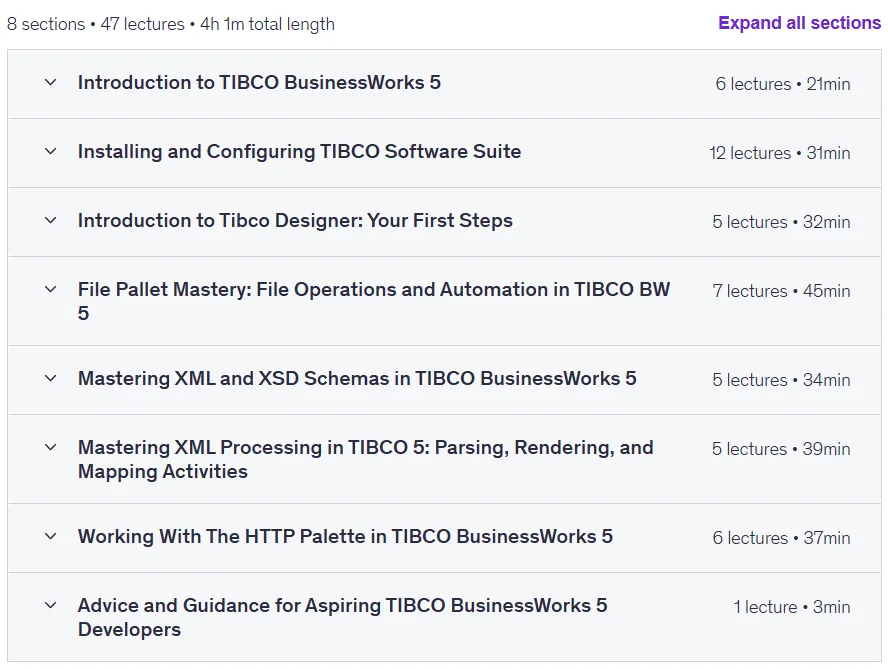
TIBCO BW 5: Design, Build and Automate Integrations. This course teaches how to use the TIBCO BusinessWorks 5 platform to create and automate integration workflows across multiple systems and requires no prior knowledge of TIBCO. The course takes participants from the fundamentals to practical applications of this industry-leading solution, emphasizing the importance of seamless integration of applications and systems in today’s digital landscape. Throughout the course, participants gain practical skills to perform real-world integration tasks such as data transformation, XML processing, working with HTTP and REST APIs, and automating complex processes. Hands-on experience is gained by building processes that can handle real-time data, file monitoring, and messaging. The examples and exercises in this course are aligned with industry best practices, and its ultimate goal is to empower individuals to effectively connect applications, databases, and services by building powerful and flexible workflows.
What you will learn
- Setting up and configuring TIBCO BW 5:
- Setup and configure TIBCO BusinessWorks 5, including all core components such as TIBCO EMS, TRA, RV, Hawk, and TIBCO Adapters.
- Understanding TIBCO architecture and key components: Exploring the BusinessWorks 5 architecture, from EMS to Hawk and TRA.
- Master TIBCO BusinessWorks 5: Gain practical skills to build, configure, and automate integration workflows.
- Workflow design and implementation:
- Navigating TIBCO Designer and creating your first integration projects.
- Implementing and managing complex workflows: Designing and implementing workflows that are triggered by various real-world conditions.
- Data automation and processing:
- Automate file monitoring and transfer with advanced actions.
- Mastery of XML Schema creation, parsing, rendering, and transformation (XSD, XSLT).
- Develop advanced XML processing skills: Parse, present, and transform XML data to meet integration requirements.
- Implementing real-time monitoring and file processing: Learn about file management, automation, and monitoring processes.
- API integration and SOA architecture:
- Explore HTTP communication and REST API integrations using the TIBCO HTTP Palette.
- Integrating REST and HTTP APIs: Master HTTP-based communication and API integration using the TIBCO HTTP Palette.
- Understand SOA architecture and the strengths of TIBCO BW for building integration solutions.
- Course Highlights:
- Install and configure TIBCO BusinessWorks components.
- Main integration patterns: messaging, data mapping, and file management.
- Processing XML and XSD to build schema-based integrations.
- HTTP and Postman basics for TIBCO API integration.
- Practical assignments to apply what you learn in real-world scenarios.
This course is suitable for people who:
- Beginners in Integration and Middleware: Ideal for those new to integration, TIBCO, and middleware technology.
- Mid-level developers looking to advance at TIBCO: Grow skills with hands-on experience and real-world projects.
- Cloud/ETL/Data Professionals: Suitable for Cloud, ETL, BI and data professionals looking to expand their knowledge of TIBCO BusinessWorks.
- Anyone curious about integration technologies: Explore integration solutions and learn about TIBCO’s industry-leading tools.
Course details
- Publisher: Udemy
- Instructor: Radoslaw Janas
- Training level: Beginner to advanced
- Training duration: 3 hours and 57 minutes
- Number of lessons: 45
Course syllabus in 2025/6

Prerequisites for TIBCO BW 5: Design Build and Automate Integrations
- No Prior TIBCO Knowledge Needed: This course covers everything from foundational concepts to advanced techniques.
- Basic Computer Skills and Internet Access: A Mac or PC with an internet connection is all you need.
- Free Software Setup: I’ll guide you through using TIBCO’s trial versions and setting up necessary tools.
- Familiarity with XML/JSON is Helpful but Not Required: Prior experience with XML/JSON is a plus, but not mandatory.
Course images

Sample course video
Installation Guide
After Extract, view with your favorite player.
Subtitles: None
Quality: 720p
Download link
Downloadly
Rapidgator link
File(s) password: www.downloadly.ir
File size
2.9 GB