Description
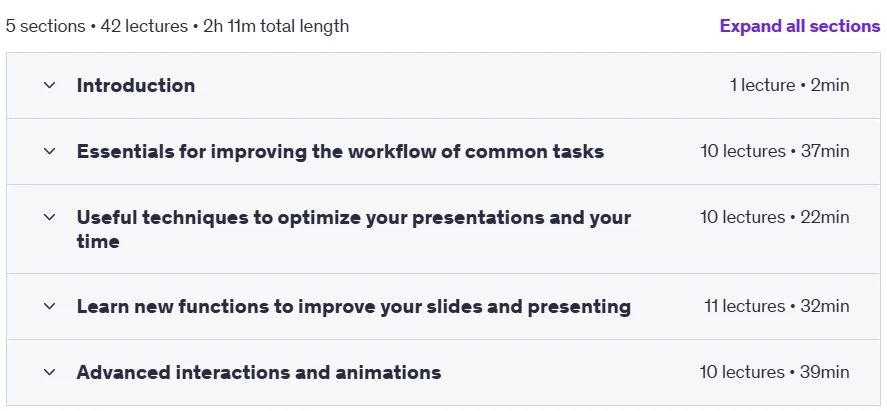
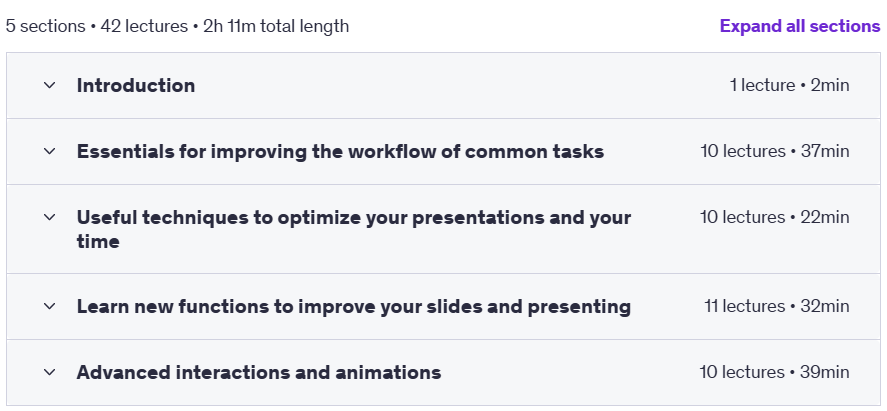
40 PowerPoint Tips and Tricks – Better Slides in Minutes. Drawing on twenty years of hands-on experience from a professional designer, this course teaches practical strategies for creating visually impactful presentations. The course content is divided into four main sections: Part One focuses on speeding up your work with techniques like quick formatting, converting text to graphics, and setting color themes. Part Two focuses on optimizing your presentation by managing the size and position of images, using custom dimensions for social media content, and using custom fonts. Part Three covers advanced design features like removing image backgrounds, creating circular text, and using live video. Finally, Part Four introduces advanced animations and interactions including motion paths, morph transitions, slide zoom, and audience engagement techniques. Designed for all levels of users, this course ranges from simple to complex tricks to help you elevate your presentations to a truly professional level.
What you will learn
- Workflow Improvement: Improve workflow for everyday tasks.
- Time Optimization: Optimize your presentations and your time.
- Learn new functions: Learn new functions to improve your slides and presentations.
- Understanding Advanced Animations: Understanding advanced interactions and animations.
- Creating a superior presentation experience: Building a superior presentation experience.
- Quick Access: Quick and easy access to all your most used commands and functions.
- Professional Graphics: Create attractive and professional social media graphics.
- Essential Shortcuts: Learn essential keyboard shortcuts for quick and accurate adjustments.
- Complex animations: Create complex, smooth animation effects between slides quickly and easily.
- Quick Formatting: Quickly apply formatting with one click.
- Custom Color Theme: Gain more control over PowerPoint colors by creating a custom color theme.
- Image Management: Use SmartArt to crop and resize all images to a fixed size.
- Combine slides: Combine slides from different presentations with formatting control.
- Reduce file size: Reduce the overall size of the PowerPoint presentation file.
- Video Content: Enrich presentations with video content while keeping file sizes manageable.
- Custom fonts: Use custom fonts in your presentation to add impact.
- And…
This course is suitable for people who:
- Anyone who wants to learn how to speed up their workflow, optimize their presentations, and learn new functions to improve their slides and presentations.
Course Details 40 PowerPoint Tips and Tricks – Better Slides in Minutes
- Publisher: Udemy
- Instructor: Alan Lomer
- Training level: Beginner to advanced
- Training duration: 2 hours and 11 minutes
- Number of lessons: 42
Course headings
Course Prerequisites 40 PowerPoint Tips and Tricks – Better Slides in Minutes
- PowerPoint 2010 / 2013 / 2016 / 2019 (or Office 365)
Course images
Sample course video
Installation Guide
After Extract, view with your favorite player.
Subtitles: None
Quality: 720p
Download link
Downloadly
Rapidgator
Password file(s): www.downloadly.ir
File size
950 MB