Description
Windows 11 Made Easy: Comprehensive Training for All Users is a course on mastering all the essential features of Microsoft’s latest operating system, published by Udemy Online Academy. It’s a comprehensive guide designed to help beginners and experienced users master all the essential features of Microsoft’s latest operating system. From basic navigation to advanced customization, this course provides a clear, step-by-step approach to making Windows 11 intuitive and efficient for personal and professional use. Whether you’re a complete beginner or an experienced user, this course is designed to help you master the features, tools, and best practices of Windows 11.
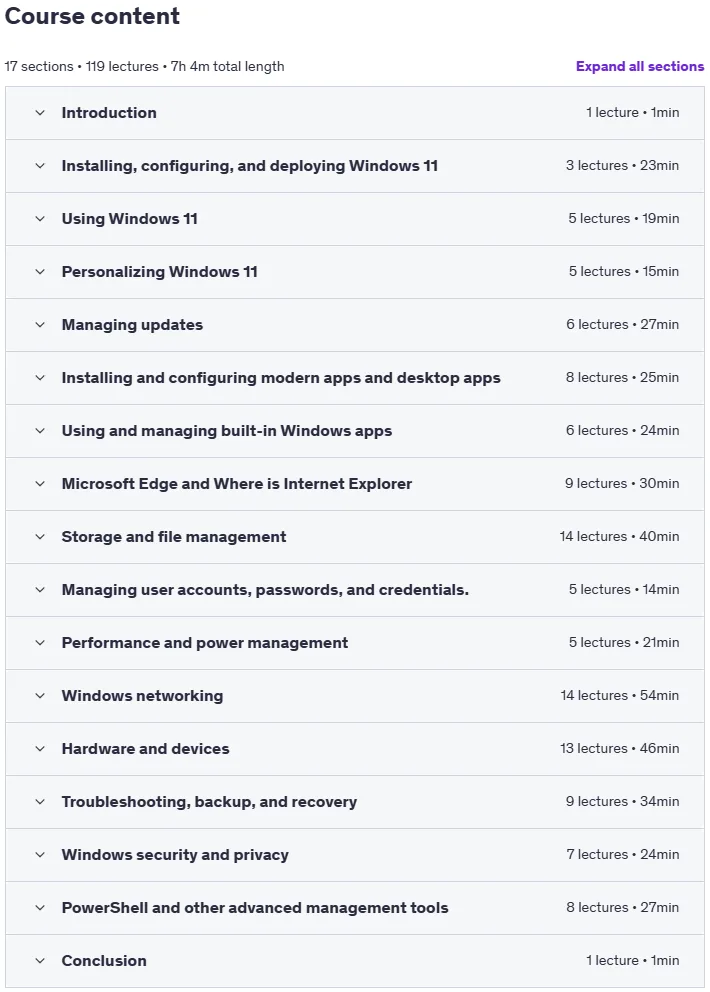
The course covers everything from setting up Windows 11, understanding the redesigned Start menu and taskbar, and using built-in apps like File Explorer, Edge, and the Microsoft Store, to managing security, privacy, and updates settings. People will gain hands-on experience with virtual desktops, widgets, snap layouts, and accessibility features while reviewing tips for faster multitasking and system optimization. It also explains how to manage user accounts, troubleshoot common issues, and customize the interface for a personalized workflow. In the end, people will be able to confidently navigate, secure, and tailor Windows 11 to their needs, ensuring a smooth and efficient computing experience.
What you will learn in Windows 11 Made Easy: Comprehensive Training for All Users:
- System Administration: Learn how to manage system settings, perform updates, and troubleshoot common problems
- File and Folder Management: Gain skills in organizing, managing, and searching for files and folders
- Application Usage: Learn how to install, manage, and use applications
- Security and Maintenance: Understand how to keep your system secure and functioning
- Productivity Tools: Discover built-in tools and features to increase productivity and efficiency
- And…
Course specifications
Publisher: Udemy
Instructors: Kelvin Johnson
Language: English
Level: Introductory to Advanced
Number of Lessons: 119
Duration: 7 hours and 4 minutes
Course topics

Windows 11 Made Easy: Comprehensive Training for All Users Prerequisites
Basic Computer Operation: Students should be comfortable using a computer, including managing files and folders, using a mouse and keyboard, and navigating basic interfaces
Internet Browsing: Familiarity with web browsing, including searching for information and using web-based applications
Device Requirements: A computer or laptop running Windows 11
System Specifications: Ensure your device meets the minimum system requirements for Windows 11
Minimum System Requirements for Windows 11: Processor: 1 GHz or faster with 2 or more cores on a compatible 64-bit processor or system on a chip (SoC). RAM: 4 GB, Storage: 64 GB or larger storage device. Firmware: UEFI, Secure Boot capable. TPM: Trusted Platform Module (TPM) version 2.0.
Pictures
Windows 11 Made Easy: Comprehensive Training for All Users introduction video
Installation guide
After Extract, watch with your favorite Player.
Subtitle: None
Quality: 720p
Download link
Downloadly
Rapidgator
File password (s): www.downloadly.ir
Size
2.8 GB