Descriptions
Product Photography for All: Create Photos That Sell, Are you ready to future‑proof your product photography skills? This newly updated bestseller combines timeless photography principles with today’s most powerful AI tools so you can create real, scroll‑stopping product photos that sell. The course walks you—camera‑agnostic, whether DSLR, mirrorless, or smartphone—through every essential step: simple camera and iPhone settings, natural and artificial lighting setups, composition and styling techniques, real photoshoot demos with live troubleshooting, and practical uses of ChatGPT, Canva AI, and Lightroom AI to plan, enhance, and promote your photos. Each section ends with an assignment so you can practice and build confidence with hands‑on examples.
You’ll learn how to control exposure and the exposure triangle, choose lenses and home‑studio accessories, use different light sources and household modifiers, photograph diverse products (jewelry, perfumes, beauty products, clothes, bags, shoes, etc.), apply enduring composition rules, crop and frame effectively, pick the best orientation and angle, and develop product styling and storytelling that connects with buyers. The instructor, Rose—an events, food, and product photographer and course creator—shares practical workflows for editing, exporting for social platforms, flat‑lay techniques for clothing, and advice on using AI smartly while keeping your creative voice and the human touch central.
What you’ll learn
- How to use ChatGPT, Canva AI, and Lightroom AI to plan, enhance, and promote your photos faster than ever
- How to photograph different products such as jewelries, perfumes, beauty products, clothes, bags, shoes, etc.
- How to take control of your most powerful weapon in creating scroll stopping product photos – Your camera.
- How to achieve a balanced exposure for professional looking product photos.
- How to choose lenses and accessories for your home studio.
- How to use different light sources to create different moods and vibes in your photos.
- How to capture great product photos anywhere
- Taking photos with whatever camera including mobile phones
- Lighting mistakes you should avoid to save you reshoots
- How to use Long standing but easy composition rules and guides to create product photos with impact
- Visual perception and how to create photos that can connect to your audience.
- How to use lines, shapes and patterns in product photography.
- How to properly crop and frame your product photos.
- How to choose the best orientation and angle to showcase the product.
- What is product styling and why it’s important in product photography.
- Why storytelling is the key ingredient in effective product styling.
- Best practices in planning for a product photoshoot.
- How to use brand adjectives to choose a theme.
- Tips and best practices when sourcing product photography props.
- More styling tips and techniques from actual product styling demo for different themes and vibe.
- My basic photo editing workflow for that final fabulous final look.
- Exporting best practices for different social media platforms.
- How to make flat lays for clothes.
Who this course is for
- Beginner Photographers
- Beginners
- Online sellers
- Bloggers
- Content creators
- Influencers
- Small Business Owners
Specificatoin of Product Photography for All: Create Photos That Sell
- Publisher : Udemy
- Teacher : Rose Nene
- Language : English
- Level : All Levels
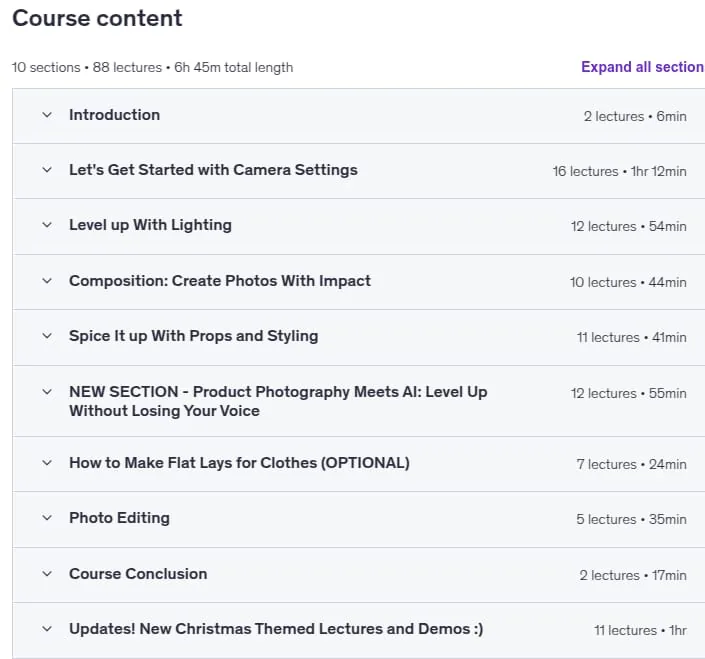
- Number of Course : 88
- Duration : 6 hours and 45 minutes
Content of Product Photography for All: Create Photos That Sell

Requirements
- Camera (Smartphone or DSLR)
- Editing Software (Optional)
- White folder or cardboard
- White cloth as light diffuser
- Product to photograph
Pictures
Sample Clip
Installation Guide
Extract the files and watch with your favorite player
Subtitle : English
Quality: 720
Download Links
Downloadly
Rapidgator
Password file(s): www.downloadly.ir
File size
7.95 GB