Description
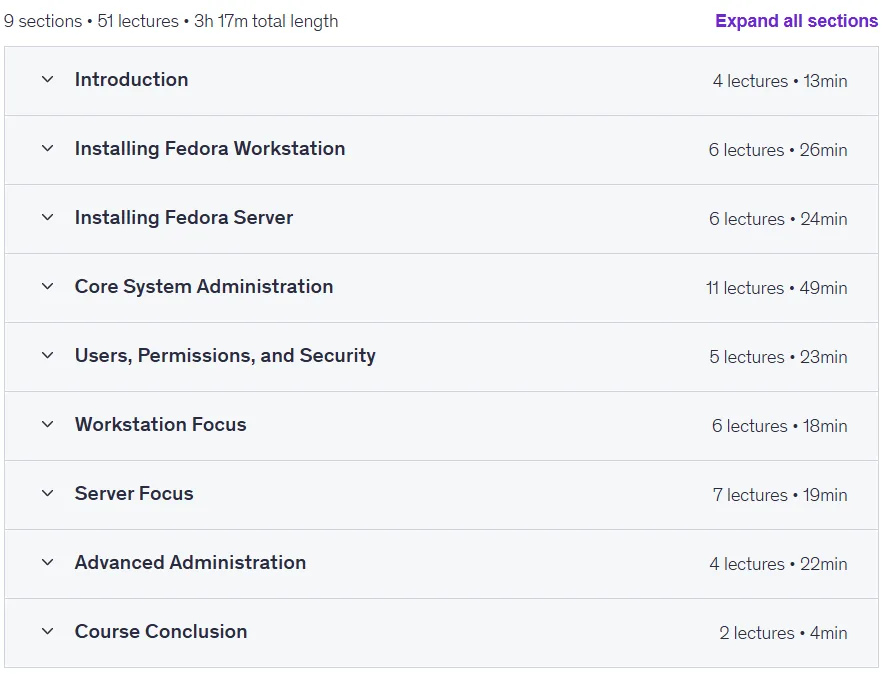
Learn Fedora Workstation and Server – Linux Fundamentals. This course is a comprehensive guide to learning, configuring, and administering the Fedora Linux operating system, designed for all levels from beginners to IT professionals, and requires no prior knowledge. The course starts with the basics, including installing Fedora, getting to know the desktop environment, and basic terminal commands, and covers both the graphical interface and the command line. It then moves on to key system administration topics, such as managing users and groups, system updates, disk management, file permissions, and sudo access. Participants will learn to install and manage software with DNF, configure a firewall with Firewalld, and set up essential services such as SSH, Samba, and DNS in practical scenarios. More advanced topics include analyzing logs with JournalCTL, monitoring system resources, backup strategies, and disaster recovery planning. For workstation users, office tools such as LibreOffice and gaming are explored, and for developers, related tools and programming environments are introduced. Security principles are covered throughout the course, and by the end, learners will have the skills and confidence to manage Fedora desktops and servers in real-world environments. Successful completion of the course leads to a valid certification that can be used to stand out on your resume and LinkedIn profile.
What you will learn
- Install Fedora Workstation and Fedora Server.
- Initial setup and navigation (GUI and CLI).
- Package management with DNF.
- Manage users, file permissions, and services.
- Configure firewall, SSH, DNS, Samba, and more.
- Monitoring, logging, and troubleshooting tools.
- Backup strategies and security best practices.
This course is suitable for people who:
- Beginners who are curious about Linux.
- IT professionals working with Fedora-based systems.
- Sysadmins and DevOps engineers who expand their knowledge of different distributions.
- Students preparing for certifications like RHCSA, LFCS, or similar.
Course details
- Publisher: Udemy
- Instructor: Dan Mill
- Training level: Beginner to advanced
- Training duration: 3 hours and 12 minutes
- Number of lessons: 52
Course syllabus as of 2025/9

Prerequisites for the Learn Fedora Workstation and Server – Linux Fundamentals course
- Basic computer skills are recommended
- Enthusiasm and curiosity!
- No previous Linux experience is required. We’ll take you from zero to confident Fedora user.
- (Optional) A PC or virtual machine to install Fedora (or access to a Fedora server)
Course images
Sample course video
Installation Guide
After Extract, view with your favorite player.
Subtitles: English
Quality: 720p
Download link
Downloadly
Rapidgator link
File(s) password: www.downloadly.ir
File size
1.1 GB