Description
Jira & Confluence Masterclass 2025 for Projects & Teams. Designed by an experienced project manager, this comprehensive course teaches you how to use Atlassian’s Jira and Confluence tools to effectively manage projects and teams. The training focuses on practical, essential applications to help you quickly master these tools. You’ll learn how to set up a project in Jira and create a workspace in Confluence, design custom workflows and pages, and manage task types including epics, stories, and tasks. The course also teaches you how to organize your backlog and sprints, use tools like components and tags for greater transparency, and create powerful dashboards and reports to monitor your project. In addition, you will learn professional integration between Jira and Confluence, use automation to delegate tasks, and advanced techniques such as work-in-progress constraints and task hierarchies. With a clear structure and real-world examples, this masterclass will provide you with the knowledge you need to apply these tools to a variety of project scenarios, from Agile and Kanban to Waterfall.
What you will learn
- Team performance and management:
- Become proficient in using Jira as a Project Manager, Team Lead, or user to improve team performance.
- Using Jira features:
- How to use and leverage Jira’s powerful features as a user.
- What can be done with specific features and how to apply them in real project situations.
- Project launch:
- Confidently launch Jira projects for any type of project, from Agile product development to Waterfall and Kanban project planning.
- Expanding functionality:
- Integrate plugins and add-ons from the Atlassian Marketplace to further enhance Jira’s functionality.
- Create and organize tasks:
- Create Epics, Stories, Tasks, and Sub-Tasks and understand how to use different types of Issues.
- Use Epics, Labels, Components, and Fix Versions to organize work and create more transparency about what needs to be done.
- Improving planning and execution:
- Use filters, workflows, and custom project settings to improve project planning and execution.
- Creating dashboards:
- Creating dashboards that help control the project and manage huge amounts of data.
- Advanced customization:
- Design workflows and custom issue types to tailor Jira to your specific needs.
- Agile Management:
- How to effectively manage Backlog and Sprints with Jira.
- Integration with Confluence:
- Integrate Confluence into Jira and use both tools in combination to increase productivity and reduce chaos.
- Use powerful Confluence elements to create meaningful pages that include Jira data.
- Automation:
- Use automations to create sub-tasks, assign issues, or add due dates to issues.
- Management reporting:
- Create Confluence status reports with integrated Jira data and an Overview page that summarizes key information for senior management.
- Practical experiences:
- Lessons learned from the project manager and Jira user experience so that others don’t have to repeat the same mistakes.
This course is suitable for people who:
- Team leaders, project managers, test managers, and Jira users who want to learn how to manage teams and projects more efficiently.
- Anyone whose company uses Jira and wants to become more proficient in using the tool’s powerful features.
- Anyone looking for an Agile, Kanban, or even Waterfall project management tool.
- Anyone looking to learn about Jira and Confluence and how they work.
- Anyone looking for examples of how to use Jira in real-world projects or product development scenarios.
- Anyone who wants to learn more about using Jira in non-Scrum or Agile product development projects or scenarios.
- This course is not for people who want to become Jira Admins; it focuses on Jira users such as team leaders, managers, project managers, test managers, and users.
Course details
- Publisher: Udemy
- Lecturer: Niels Rabe Agile Coach, Project Manager, Scrum Master
- Training level: Beginner to advanced
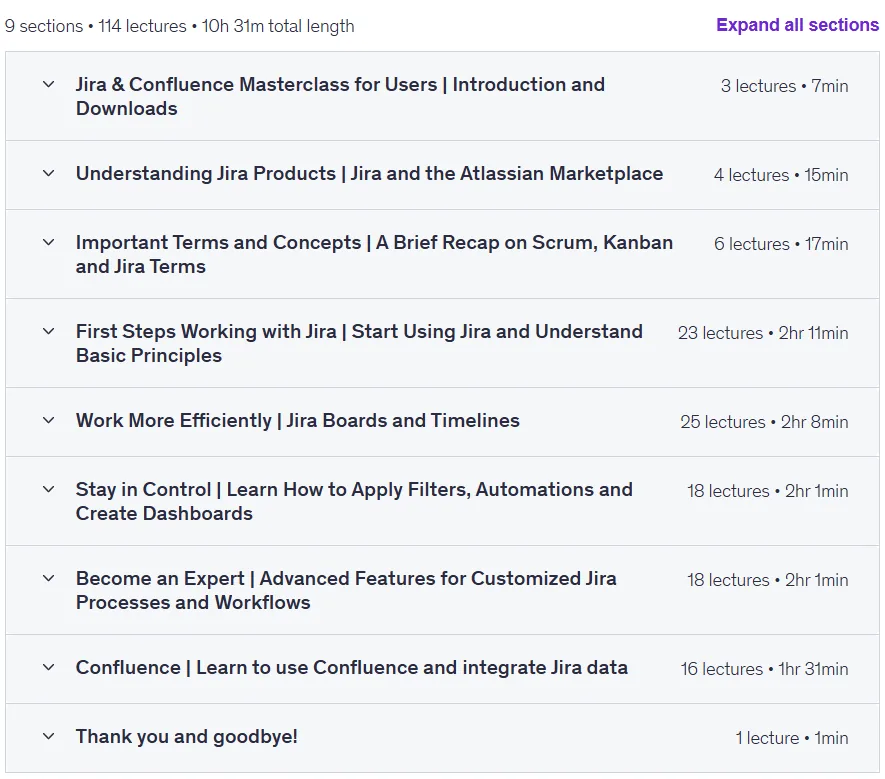
- Training duration: 10 hours and 31 minutes
- Number of lessons: 114 lessons
Course syllabus

Prerequisites for the Jira & Confluence Masterclass 2025 for Projects & Teams course
- There are no requirements for this course
- However, I strongly encourage you to follow along with your own Jira project to make the most out of this course. You’ll find a guide on how to create your own account in the course
Course images
Sample course video
Installation Guide
After Extract, view with your favorite player.
Subtitles: English
Quality: 1080p
Changes:
Version 2025/3 compared to 2025/1 has increased by 16 minutes in duration. English subtitles were also added to the course.
Download link
Downloadly
Rapidgator
File(s) password: www.downloadly.ir
File size
12.07 GB