Descriptions
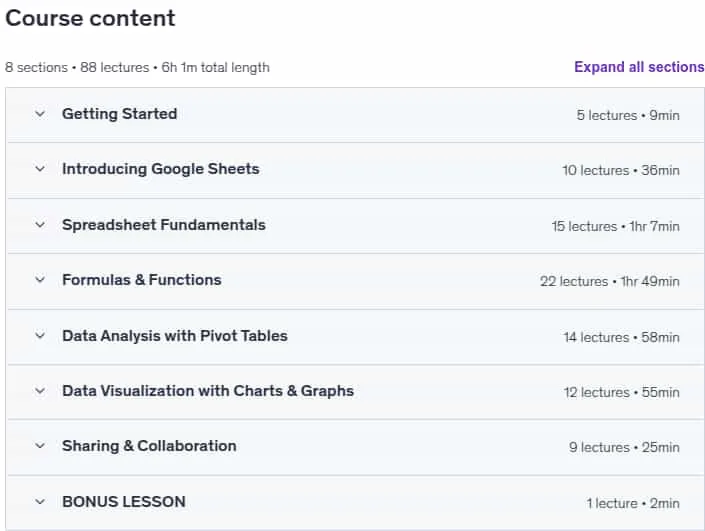
Google Sheets for Data Analysis & Business Intelligence, This is a hands-on, project-based course designed to help you build the skills you need to manage, explore, analyze, and visualize data in Google Sheets. You will start by learning the Google Sheets interface and workflow, then move on to spreadsheet fundamentals such as table structures, data types, formatting, sorting, and filtering. The course covers formulas and functions for data analysis, including syntax, reference types, and common errors, and provides practical techniques for data management and analysis. You will use functions to count and aggregate values, create logical tests, join data across tables, and manipulate text and date values. Pivot Tables are introduced as essential tools for data exploration and analysis, with lessons on preparing raw data, creating views, and applying sorting, grouping, and calculated fields. The course also covers data visualization and storytelling, best practices for effective design, and creating visuals like bar and column charts, line and area charts, scatterplots, and maps. Finally, you will learn about Google Sheets’ unique sharing and collaboration features, including comments, notifications, edit history, and sheet protection.
What you’ll learn
- Learn how to create and manage worksheets and navigate the Google Sheets interface
- Build foundational data literacy skills, including managing, exploring, analyzing and visualizing data
- Write spreadsheet formulas and functions to aggregate values, create logical tests, join data, and manipulate text and dates
- Use Pivot Tables to explore and analyze data, including grouping, sorting, filtering and more
- Learn data visualization and storytelling best practices, and bring data to life using common charts and graphs
- Apply sharing and collaboration tools like notes, comments, timelines, protection, and web publishing
Who this course is for
- Spreadsheet users who want to build job-ready data prep, data analysis, visualization and collaboration skills
- Data professionals looking for an intuitive, comprehensive introduction to Google Sheets
- Students looking to learn practical skills with unique, hands-on projects and demos
- Anyone looking to develop core data literacy and analytical thinking skills
Specificatoin of Google Sheets for Data Analysis & Business Intelligence
- Publisher : Udemy
- Teacher : Maven Analytics • 1,500,000 Learners , Enrique Ruiz
- Language : English
- Level : All Levels
- Number of Course : 88
- Duration : 6 hours and 1 minutes
Content of Google Sheets for Data Analysis & Business Intelligence

Requirements
- We’ll be using Google Sheets for course demos (free, in-browser)
- No experience required – we’ll start with the absolute basics!
Pictures

Sample Clip
Installation Guide
Extract the files and watch with your favorite player
Subtitle : English
Quality: 720
Download Links
Downloadly
Rapidgator
Password file(s): www.downloadly.ir
File size
2.39 GB