Description
Advanced Microsoft Windows 11 File Management for IT Mastery. This course is designed to enhance advanced file management skills in Microsoft Windows 11 for IT professionals and power users, increasing their security and productivity. This comprehensive eight-module course provides mastery of the powerful file management capabilities of the operating system and teaches advanced techniques that will transform the way you organize, secure, and manipulate files. The course content includes thirty-two practical video lessons with step-by-step processes that cover real-world scenarios and solutions to everyday file management challenges. Participants also receive a set of ready-made PowerShell scripts and commands that they can immediately apply in their work environment. Leveraging professional techniques used by IT managers and power users, this course helps individuals gain complete control over their files and increase personal and organizational productivity through advanced methods that are often overlooked.
What you will learn
- Windows file system management.
- Basic Windows Networking.
- Command Line and PowerShell Management.
- Advanced use of File Explorer.
- Share and NTFS permissions.
- File compression and encryption techniques.
- Methods for backing up files and folders.
- Windows System Recovery Backup.
- File system and drive troubleshooting.
- How to work with and customize the newly designed File Explorer in Windows 11.
- Implement advanced search strategies and file organization techniques.
- Configure appropriate permissions and access controls for secure file sharing.
- Use compression and encryption for efficient storage management.
- Harness PowerShell automation for powerful batch file operations.
- Set up reliable backup systems to protect important data.
- Troubleshoot common file system problems with professional tools.
This course is suitable for people who:
- IT professionals looking to upgrade their Windows 11 administration skills.
- Office workers who manage large volumes of documents and files.
- Home users who want to organize their digital lives more efficiently.
- Anyone who is transitioning to Windows 11 and wants to master the new file system capabilities.
- Windows Administrators.
- System Administrators.
- Help Desk Technicians.
- Home Users.
- Desktop Support Staff.
Course details
- Publisher: Udemy
- Instructor: James Bernstein , David Bernstein
- Training level: Beginner to advanced
- Training duration: 5 hours and 5 minutes
- Number of lessons: 41
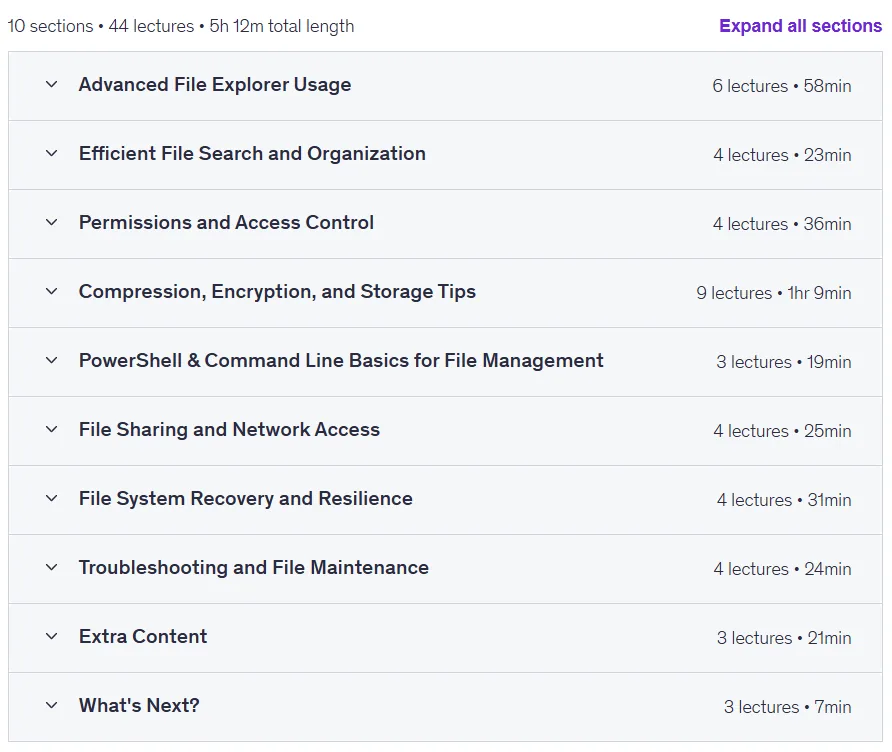
Course syllabus as of 2025/9
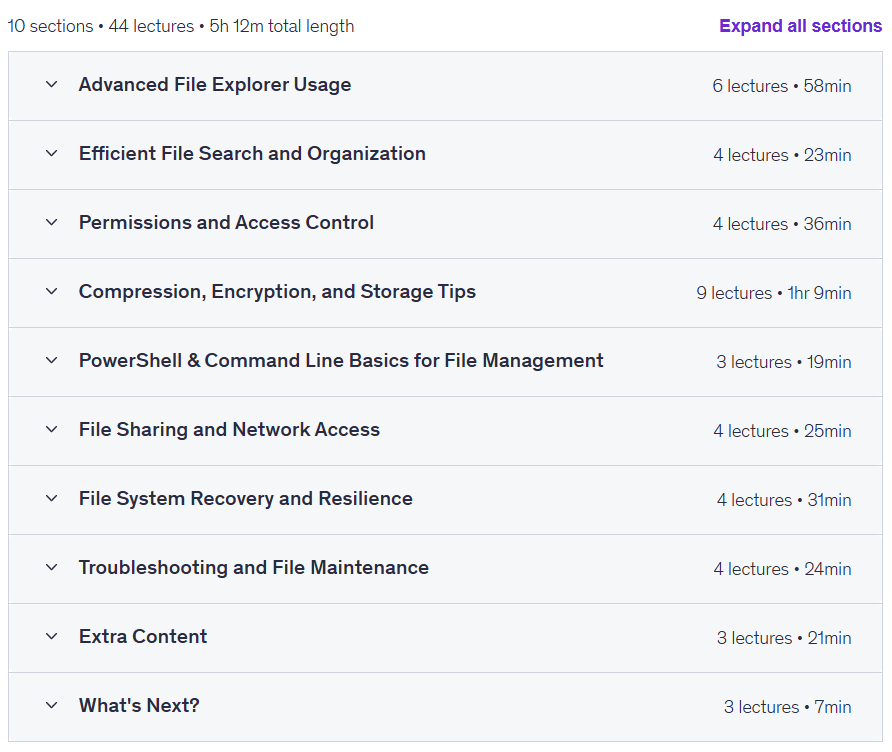
Prerequisites for the Advanced Microsoft Windows 11 File Management for IT Mastery course
- A desktop computer or laptop preferably running Windows 11
- Basic computer knowledge
- Familiarity with the Windows 11 operating system
Course images

Sample course video
Installation Guide
After Extract, view with your favorite player.
Subtitles: None
Quality: 720p
Download link
Downloadly
Rapidgator link
File(s) password: www.downloadly.ir
File size
2.6 GB