Descriptions
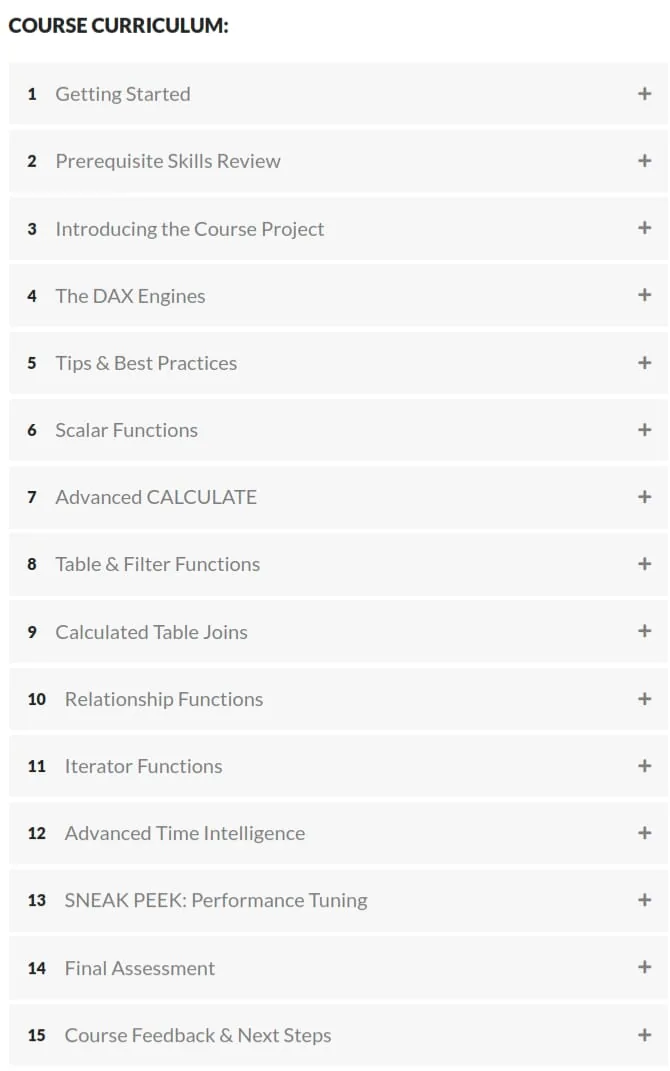
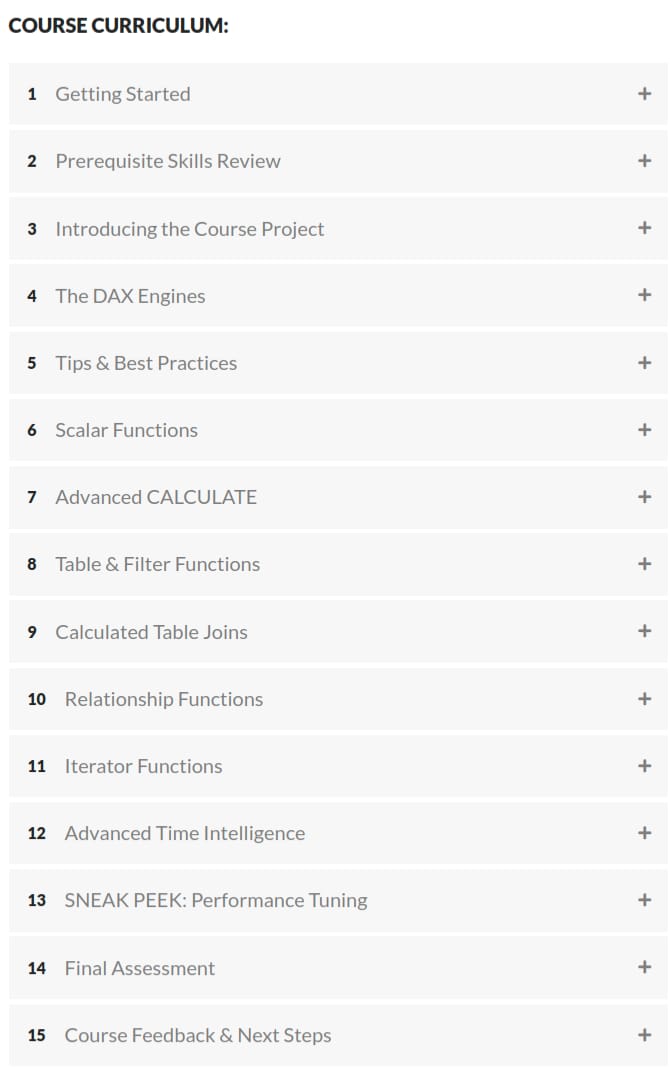
Advanced DAX for Power BI, For users looking to take their Power BI skills to the next level, mastering Data Analysis Expressions (DAX) is a MUST. In this hands-on, project-based course, you’ll put your DAX skills to the test and apply what you learn to some of the toughest real-world business intelligence use cases. You’ll be playing the role of Lead Business Intelligence Analyst for Maven Roasters, a small-batch coffee chain based in New York City. Your goal? Use Power BI and DAX to answer key questions and deliver data-driven insights for the business, by analyzing product inventory, repeat customers, store-level performance, and everything in between. We’ll start by quickly reviewing prerequisite topics (evaluation context, filter flow, basic measures, etc.), then dive behind the scenes to explore how the DAX formula and storage engines actually work, including query evaluation, columnar structures, and VertiPaq compression and encoding. From there we’ll cover helpful tips and best practices for DAX power users, including variables, comments, query formatting and error handling, then dive deep into scalar functions, iterators, filter functions, advanced time intelligence, calculated table joins, relationship functions, and more. Finally, we’ll give a sneak peek into performance tuning and query optimization using DAX Studio and Power BI’s Performance Analyzer tool. If you’re looking to build expert-level data analysis skills using DAX and Power BI, this is the course for you.
What you’ll learn
- Identify fundamental DAX concepts and data modeling best practices, including evaluation context, filter context, filter flow, and measure and calculated column creation
- Identify CALCULATE syntax, common use cases, modifiers, context transition, filter arguments, and interactions with tables
- Identify common time intelligence functions and patterns, including week-based calculations, date formatting, and automatic and custom date tables
- Identify common calculated table join expressions, including CROSSJOIN, UNION, EXCEPT, and INTERSECT
- Identify iterator functions and syntax, when to use common functions, iterator cardinality and performance, and calculation granularity
- Identify common relationship functions and relationship types, include expanded tables, traversing relationships, and physical and virtual relationships
- Identify common scalar functions, including aggregation, rounding, information, conversion, and logical
- Identify table and filter expressions, including functions that filter, add, explore, and create data
Who this course is for
- Analytics or BI professionals looking to build expert-level DAX skills
- Power BI users tasked with solving unique and complex analytics use cases
- Students who are comfortable with DAX and Power BI and want to dig deeper
Specificatoin of Advanced DAX for Power BI
- Publisher : Maven Analytics
- Teacher : Aaron Parry
- Language : English
- Level : All Levels
- Duration : 19 hours and 0 minutes
Content of Advanced DAX for Power BI
Requirements
- Students are strongly encouraged to complete our intro-level Power BI Desktop course before attempting this one
- We’ll be using Power BI Desktop throughout the course (free download)
Pictures

Sample Clip
Installation Guide
Extract the files and watch with your favorite player
Subtitle : English
Quality: 1080p
Download Links
Downloadly
Rapidgator
Password file(s): www.downloadly.ir
File size
2 GB