Description
Advanced Windows 11 for Local Administrators. This course is designed for system administrators who are responsible for managing users, resources, and computers on a local network and will introduce you to the advanced features of Windows 11 in this area. This course is designed for advanced users and teaches them how to use new capabilities to increase user productivity and ensure data security more effectively. Course instructor Julie Ballou teaches essential and advanced skills, including the effective use of applications such as Teams, unified calendar, OneDrive, and multiple desktops to facilitate communication. It also provides key points about securing resources using software and hardware solutions, including new technologies such as Microsoft Pluto and personal data encryption. The ultimate goal of this course is to empower administrators to implement advanced security settings, increase team productivity, and effectively manage in modern workplaces. Participants will achieve a higher level of control and security in their local network by learning to manage local group policies, use modern collaboration tools, and implement hardware-based security measures.
What you will learn
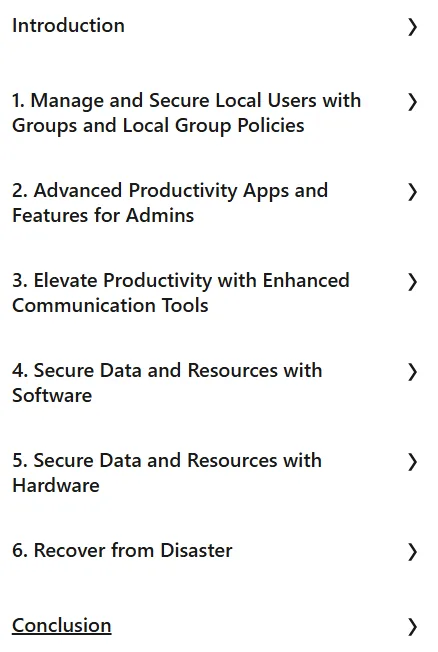
- Manage and secure local users using Groups and Local Group Policies.
- Create Users and Groups and configure a Local Group Policy to secure access to features.
- Configure Local Security Policies to secure login attempts and apply them to specific users.
- Use advanced productivity apps and features for administrators, including protecting user data with OneDrive.
- Implementing Windows Hello and integrating biometric technology.
- Explore File Explorer tabs, use Taskbar Overflow, and configure the Taskbar.
- Configure and test new Voice Dictation Commands and use Copilot and Artificial Intelligence (AI) integration.
- Increase productivity with advanced communication tools, including collaboration with Microsoft Edge and Microsoft OneDrive.
- Limit interruptions and use and share a calendar to communicate with local users.
- Create and customize multiple desktops.
- Secure data and resources with software solutions, including preventing or preparing for system failures and configuring Microsoft Defender SmartScreen.
- Create a Recovery Drive and System Image.
- Securing data and resources with hardware solutions, including the use of Trusted Platform Module (TPM) technologies and Microsoft Pluton checks.
- Review of Hardware-Based Isolation and Hardware-Based Encryption.
- Use Hardware-Enforced Stack Protection and understand Kernel Direct Memory Access (DMA) Protection.
- Enable and understand how Secure Boot works.
- Disaster Recovery, including using Quick Assist for remote troubleshooting by a technician.
- Access recovery settings and review the Recovery Environment and System Restore with Reset Options.
- Recover a system with a recovery drive or the Windows File Recovery tool.
- Analyze the boot process to discover hidden problems.
This course is suitable for people who:
- System Administrators and Network Administrators, who are responsible for managing computers, users, and security on local networks.
- Experienced Windows 11 users looking to learn advanced management capabilities and optimize productivity and security in their workplaces.
- IT Professionals who want to take advantage of the latest Windows 11 features to more effectively manage resources and keep data secure.
- People in IT management or support roles who need to create and manage local user accounts, security policies, and collaboration tools.
Advanced Windows 11 for Local Administrators course details
- Publisher: LinkedIn
- Instructor: Joli Ballew
- Training level: Advanced
- Training duration: 2 hours
Course headings

Course images

Sample course video
Installation Guide
After Extract, view with your favorite player.
Subtitles: English
Quality: 720p
Download link
Downloadly
Rapidgator link
File(s) password: www.downloadly.ir
File size
177 MB