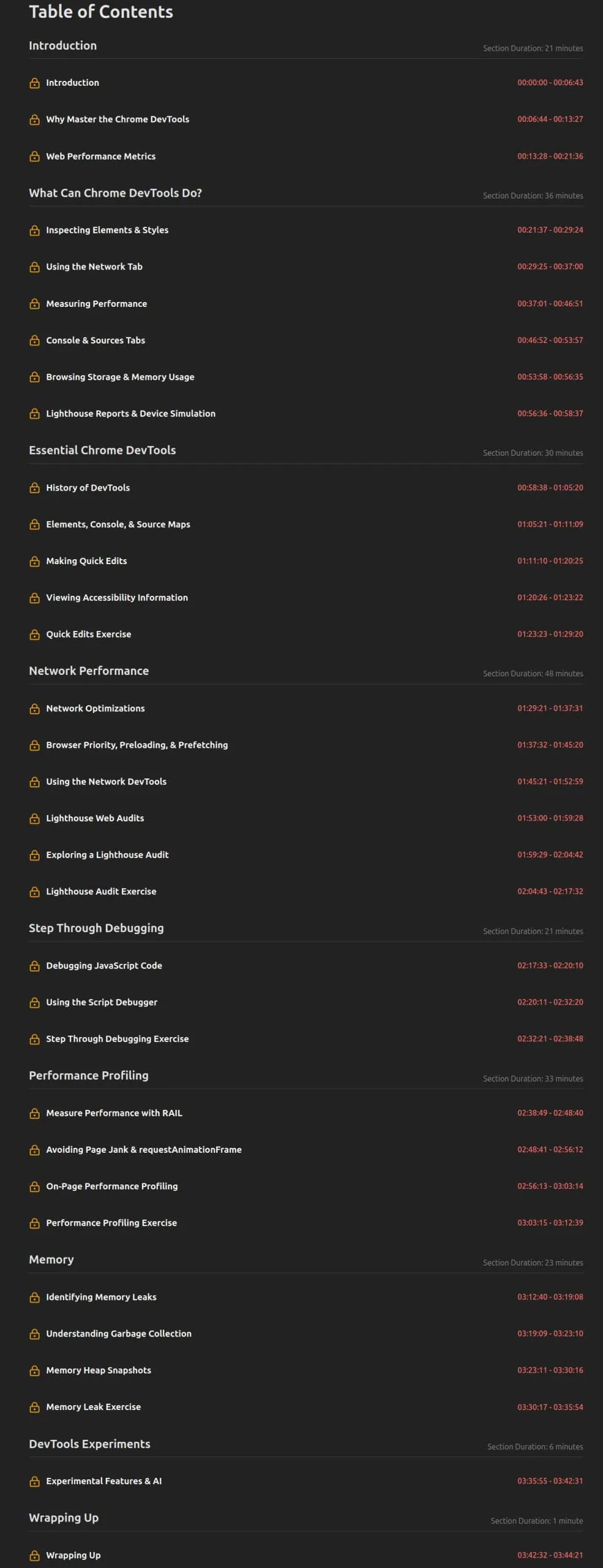
Mastering Chrome Developer Tools, v4. This course teaches you how to inspect, debug, and audit web applications faster with professional skills in Chrome DevTools.Inspect, debug, and audit web applications faster with professional skills in Chrome DevTools! Prototype user interfaces live in the browser using the DOM inspector. Go beyond console.log() with step-by-step debugging and track memory performance to identify bottlenecks in your code. Use the network panel and run Lighthouse reports to ensure your applications are high-performing and compliant with the latest performance, SEO, and accessibility best practices.
What you will learn:
- Inspect, debug, and audit web applications using Chrome DevTools
- Prototype UIs live in the browser with the DOM inspector
- Step-by-step debugging and memory performance tracking
- Using the network panel and running Lighthouse reports
- Ensuring high performance and compliance with performance, SEO, and accessibility best practices
Who is this course suitable for?
- Web developers who want to improve their Chrome DevTools skills.
- Developers who want to create high-performance web applications that adhere to best practices.
- Anyone who wants to learn about Chrome DevTools and modern web development.