Descriptions
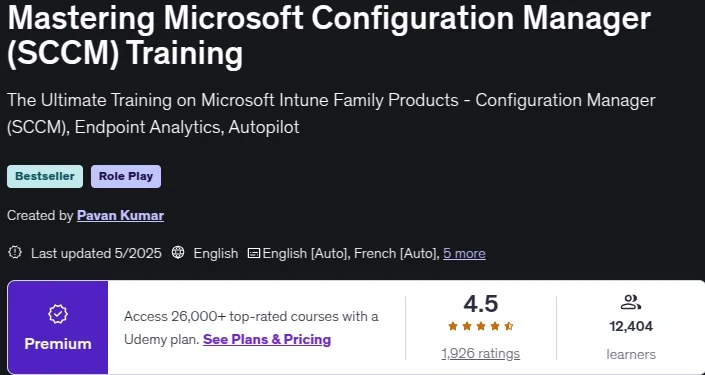
Mastering Microsoft Configuration Manager (SCCM) Training, This course will be very useful for students who want to Learn Microsoft Configuration Manager (SCCM / Endpoint Configuration Manager) in-depth from Ground Level Zero to Hero Level. This a is premium course with all concepts with more than 66+ hrs of in-depth concepts and step-by-step video content that can take your skill to next level. Microsoft Configuration (old name as Endpoint) Manager Current Branch or SCCM a product helps deliver the modern workplace and modern management to keep your data secure, in the cloud and on-premises. Configuration Manager includes the services and tools you use to manage and monitor On premisis mobile devices, desktop computers, virtual machines, embedded devices, and servers.
Microsoft Intune is a 100% cloud-based mobile device management (MDM) and mobile application management (MAM) provider for your apps and devices. It lets you control features and settings on Android, Android Enterprise, iOS/iPadOS, macOS, and Windows 10 devices. It integrates with other services, including Azure Active Directory (AD), mobile threat defenders, ADMX templates, Win32 and custom LOB apps, and more. As part of this training course, I have demonstrated on-premises infrastructure i.e., an Active Directory connector to manage on-premises devices with Intune.
What you’ll learn
- SCCM Training | Microsoft Intune Product Family Training | Microsoft SCCM training | Microsoft System Center Configuration Manager (Current Branch) training
- MSCM / MECM / MEMCM / SCCM Interview Questions and Answers – With explanation on how to and reasoning
- Microsoft Configuration Manager Current Branch Latest Version 2303
- Introduction to Microsoft Intune Family Products Suite
- SCCM / MECM Features and Capabilities
- Create your own MSCM / SCCM / MECM LAB Domain Controller Create a VM as Member Server
- Designing SCCM Hierarchy – SCCM / MECM Site Types CAS , Primary, Secondary and Remote Distribution Points
- Design concepts to decide Central Administration Site (CAS) , Primary Site, Secondary site or Remote / Distribution Point
- Validate Pre-Requests to Install SCCM Server
- Install MSCM / SCCM / MECM Standalone Primary Site
- Install SCCM / MECM / MSCM CAS Site
- Install SCCM / MECM / MSCM Secondary Site
- Design and deploy SCCM / MECM / MSCM Hierarchy
Who this course is for
- Anyone wanting to learn Modern Desktop Management
- Students who want to learn SCCM / MECM / MSCM / Microsoft Configuration Manager Current Branch
- Students who want to learn SCCM / MECM / MSCM / Microsoft Configuration Manager Current Branch
- Students who are attending interviews on SCCM /Microsoft Endpoint manager / MSCM / Microsoft Configuration Manager Current Branch
- Students who want to learn ConfigMgr / Microsoft Endpoint manager /MSCM / Microsoft Configuration Manager Current Branch
- Students who want to learn Configuration manager Current Branch / Microsoft Endpoint manager / MSCM
- IT professionals that wants to learn how to administrate and deploy latest version of SCCM / MSCM / Microsoft Configuration Manager Current Branch
- Beginners to Experts can take this course as it has indepth course content
- Windows System Administrators want to learn SCCM / MSCM / Microsoft Configuration Manager Current Branch Administration and design
- Working with SCCM Server or Client side and looking for upgrade Skills with advance concepts like OSD, IBCM,CMG and co-Management
Specificatoin of Mastering Microsoft Configuration Manager (SCCM) Training
- Publisher : Udemy
- Teacher : Pavan Kumar
- Language: English
- Level : All Levels
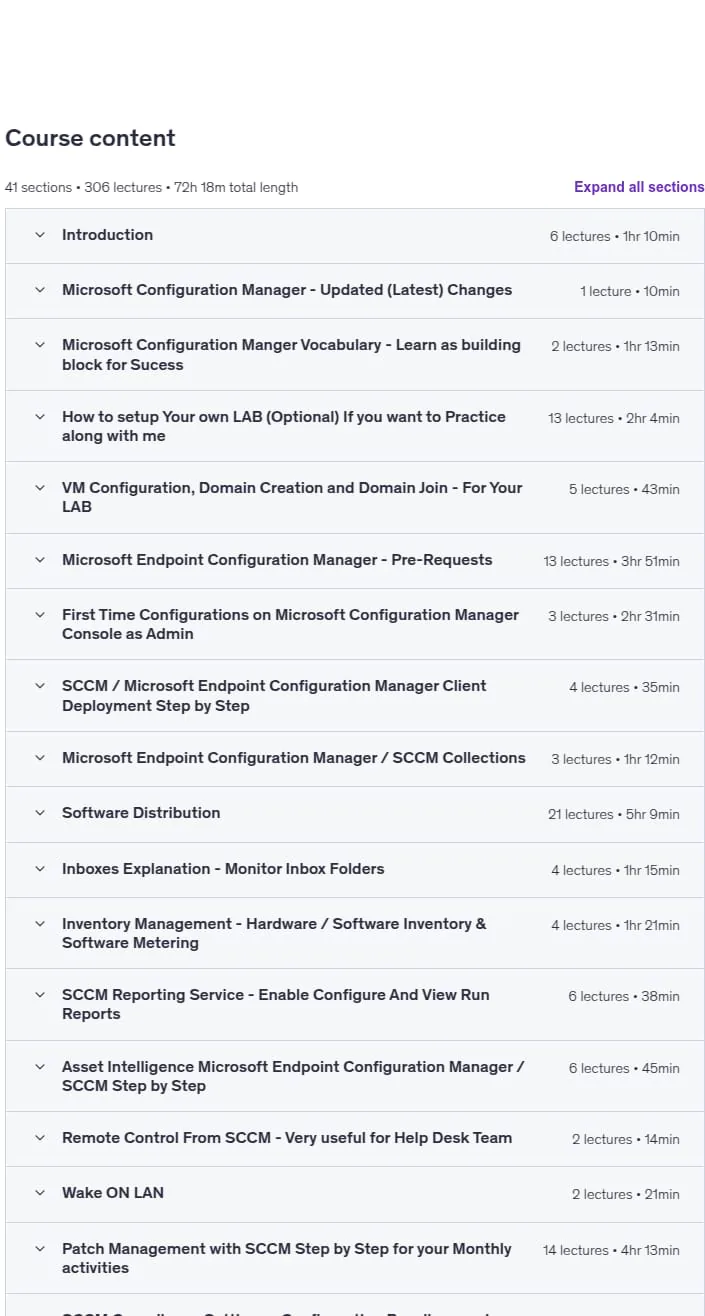
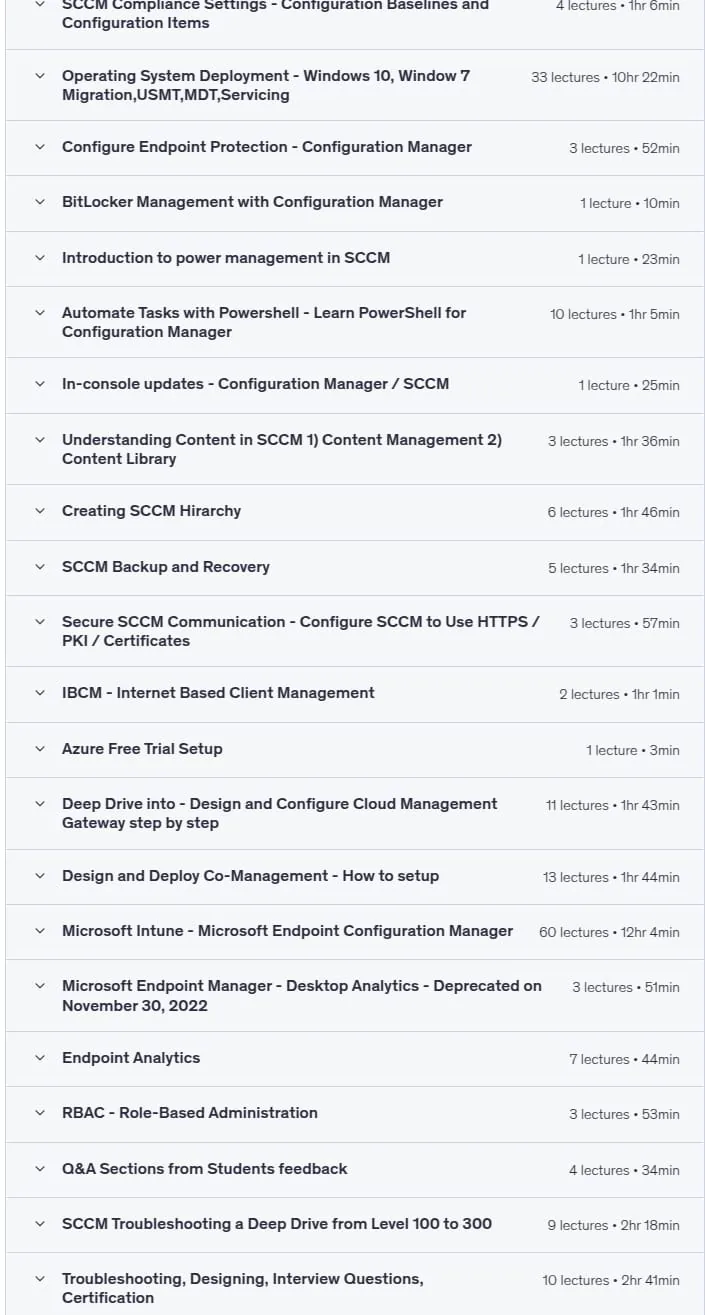
- Lectures : 306
- Duration : 72 hours and 18 minutes
Content of Mastering Microsoft Configuration Manager (SCCM) Training


Requirements
- No prior knowledge of SCCM/MEM / MSCM / Microsoft Configuration Manager Current Branch is required
- No paid software required – we will be using free and evaluation software to complete hands-on training
- Experience with Active Directory and Group Policy is helpful but not necessary
- No prior knowledge of SCCM / MSCM / Microsoft Configuration Manager Current Branch is required
- No prior knowledge of Microsoft Endpoint manager or MSCM / Microsoft Configuration Manager Current Branch required
Pictures

Sample Clip
Installation Guide
Extract the files and watch with your favorite player
Subtitle : English
Quality: 720p
The 2025/5 version has increased the number of lessons by 25 and the duration increased by 2 hours 42 minutes compared to 2023/9.
Download Links
Downloadly
Rapidgator
Password file(s): www.downloadly.ir
File size
23.68 GB