Description
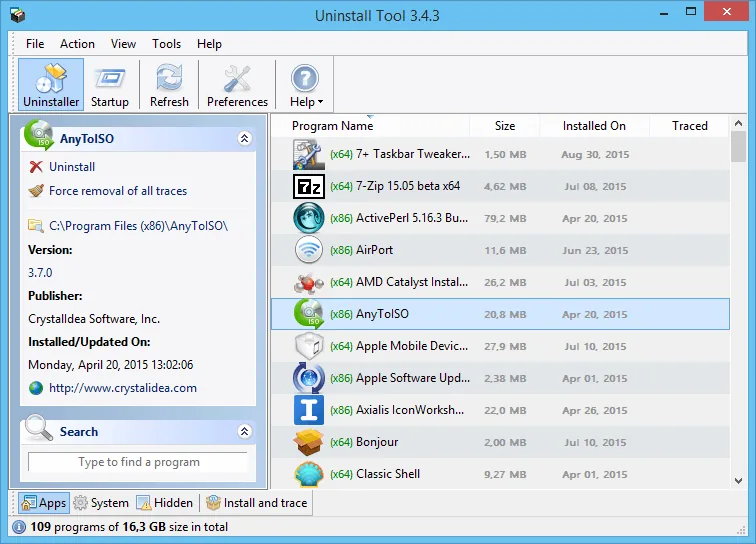
Uninstall Tool is a powerful software to remove unused software and their leftover files from your system. With Uninstall Tool you can remove the software you want with registry entries and all the remnants of that software from your windows. In Windows, there is a tool for removing software, but it is not capable of completely removing additional files and registry entries.
With Uninstall Tool you can even remove heavy software such as Photoshop and antivirus completely without leaving the slightest trace. Using the “Install and Trace” feature you can monitor the installation process of a software and identify all the files and registries that the software adds to the system. If you want to remove the software, you can easily delete all identified files and registries.
If you want to replace your antivirus and delete your old antivirus with Windows Removal Tool, the new antivirus will warn you that the old antivirus is still on the system. The Uninstall Tool can easily remove your old antivirus with no traces left.
Features and Features of Uninstall Tool:
- Startup management tool for managing software startups on Windows startup
- Ability to put the Uninstall Tool in the Control Panel
- Display full name, occupied size and date of installation of the software
- Extract HTML from software list
- There are two ways to remove software
- Delete all remaining files or Temp
- Remove all registry entries that were not cleared by deleting the software
- Install and Trace feature to monitor software installation process and identify all software files
- Startup manager for managing automatic startup programs
required system
CPU: 500 MHz Intel or compatible
Disk Space: 5 MB
RAM: 128 MB – 256 MB recommended
800 × 600 screen resolution with 256 colors – better 1024 × 768 screen resolution with 16.7 million colors
Pictures

Installation guide
Read the Readme.txt file in the Crack folder.
Download link
Download Uninstall Tool 3.8.0.5730 Multilingual
Download Uninstall Tool 3.5.10 Build 5670 Multilingual Portable
File password (s): www.downloadly.ir
Size
Installed version: 5 MB
Portable Version: 4 MB