Description
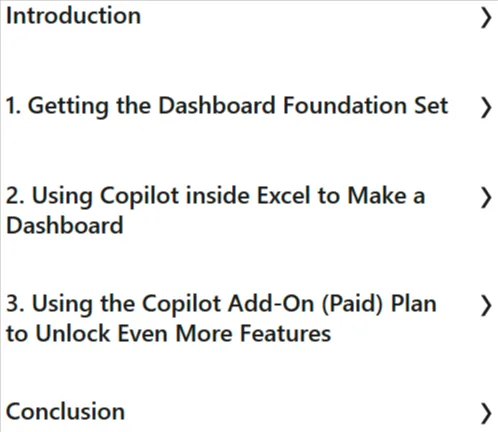
Copilot in Excel: Building Dynamic Dashboards is a course on using Microsoft Copilot in Excel to build intelligent, dynamic dashboards published by LinkedIn Online Academy. This is a hands-on, hands-on course that teaches you how to use Microsoft Copilot in Excel to build intelligent, dynamic dashboards that easily transform your data into actionable insights. You’ll learn how to integrate Copilot’s natural language interface to generate formulas, automate data transformations, and create responsive visualizations like charts and PivotTables just by asking—speeding up your workflow and reducing manual effort. This course covers the fundamentals of dashboard design, how to structure your data for efficiency, and how to combine the elements generated by Copilot with advanced Excel features like slicers, interactive filters, and conditional formatting.
Designed for Excel and Copilot users who manage or analyze data, this course covers the core components of a dashboard—datasets, PivotTables, PivotCharts, and slicers—while also using Copilot to brainstorm KPIs, generate formulas, create visualizations, and apply clean formatting. Ann also emphasizes when Copilot support helps and when manual techniques offer more control. By the end, you’ll be able to confidently build professional, dynamic dashboards powered by Copilot and Excel’s analytical tools, with key topics including AI-powered formula creation, visualization techniques, interaction, data preparation, and performance optimization all covered in a cohesive learning experience.
What you will learn in Copilot in Excel: Building Dynamic Dashboards:
- Microsoft Copypilot
- Microsoft Excel
- Get the dashboard base set
- Use Copypilot inside Excel to create dashboards
- Use the Copypilot add-in (paid) to unlock more features
- And…
Course specifications
Publisher: LinkedIn
Instructors: Ann K Emery
Language: English
Level:Intermediate
Number of Lessons: 17
Duration: 53m
Course topics

Copilot in Excel: Building Dynamic Dashboards Prerequisites
None
Pictures

Copilot in Excel: Building Dynamic Dashboards introduction video
Installation guide
After Extract, watch with your favorite Player.
English subtitle
Quality: 720p
Downloadly link
Rapidgator link
File password (s): www.downloadly.ir
Size
196 MB