Description
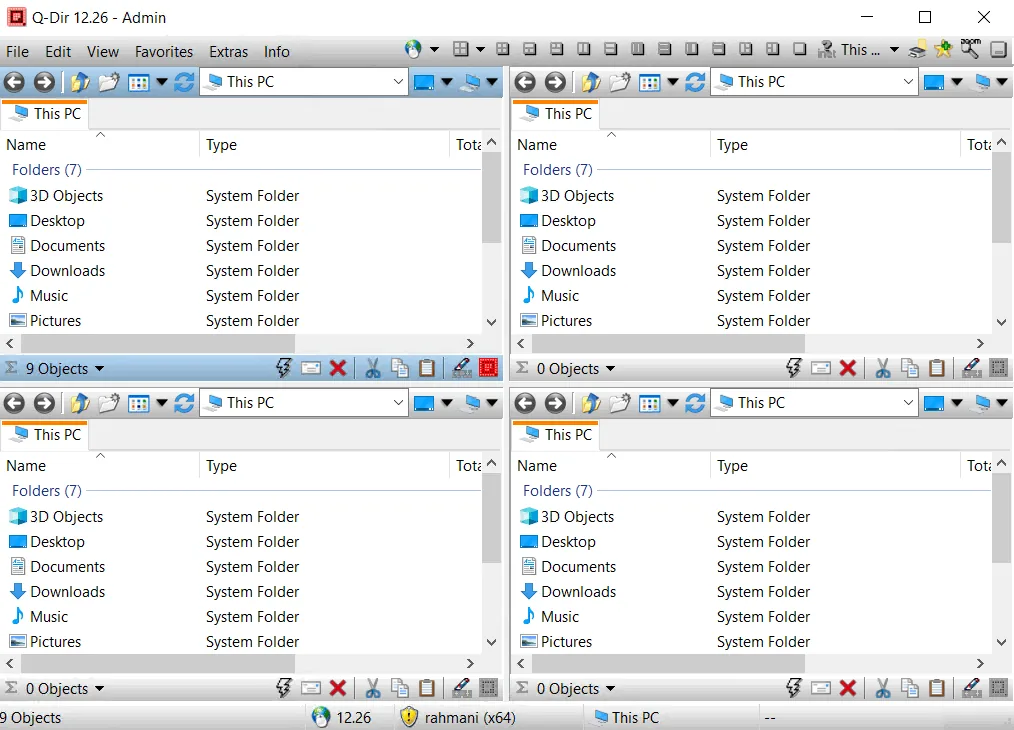
Q-Dir (also known as Quad Explorer) is a program for the Windows operating system that makes it easy to manage files and folders. The program is available in both installable and portable versions. With Q-Dir, you can quickly and easily access hard drives, network folders, USB-Sticks, floppy disks and other storage devices. Q-Dir is a powerful file manager with the unique Quadro-View technique. The program retains all the usual Windows features such as Drag and Drop, various Views and other system functions, and there is no need to neglect them.
Q-Dir does not require installation and can be easily run from the desktop. To use the Portable version, simply rename the file Q-Dir_Installer.exe to Q-Dir.exe. This program is a small and well-known tool for Windows computers and is also a useful tool for USB-Sticks.
Program features and functions
- Favorites: Provides quick access to frequently used folders.
- Drag&Drop: Allows you to move files by dragging and dropping in Q-views as well as other programs such as MS Explorer.
- Clipboard: Allows copy/paste between Q-Dir directory views and other applications such as MS Explorer.
- Folder-Type: Supports folder types such as ZIP, FTP, Cabinet, Network, System, and Shortcut.
- Views: Includes various views such as Large icons, Tiles, List, Detail, Thumbnail (in Windows Vista: Extra large symbols).
- Export: Allows you to export information to XLS, CSV, TXT, and HTML formats.
- Popup Menus: Has pop-up menus for Desktop and My Computer.
- Screen magnifier: It has the ability to magnify anything on the screen.
- Color Filter: Allows you to assign different colors to different item types (such as .log; .txt).
- Highlight-Filter: An effective way to quickly highlight items.
- File-Filter: Allows for quick and easy filtering of items.
- Columns: Supports all columns and has column storage functionality.
- Quick-Link´s: Used for quick access to folders.
- Folder-Select: Enables quick and flexible folder selection via Address-bar, Desktop menu, My-Computer menu, etc.
- Multi-INI: Allows the use of multiple INI files for Q-Dir.
- Tree-View: It has a simple, four-tier tree view.
- Preview: Allows quick preview of files.
System requirements
- Operating Systems: Q-Dir runs on Windows XP, Vista, 7, 8, 10, and 11 (both 32-bit and 64-bit). It also functions properly across Windows Server environments.
Pictures

Installation Guide and Tips
The software does not require cracking.
Download link
Download Q-Dir 12.67 Multilingual
File(s) password: www.downloadly.ir
File size
1 MB