Description
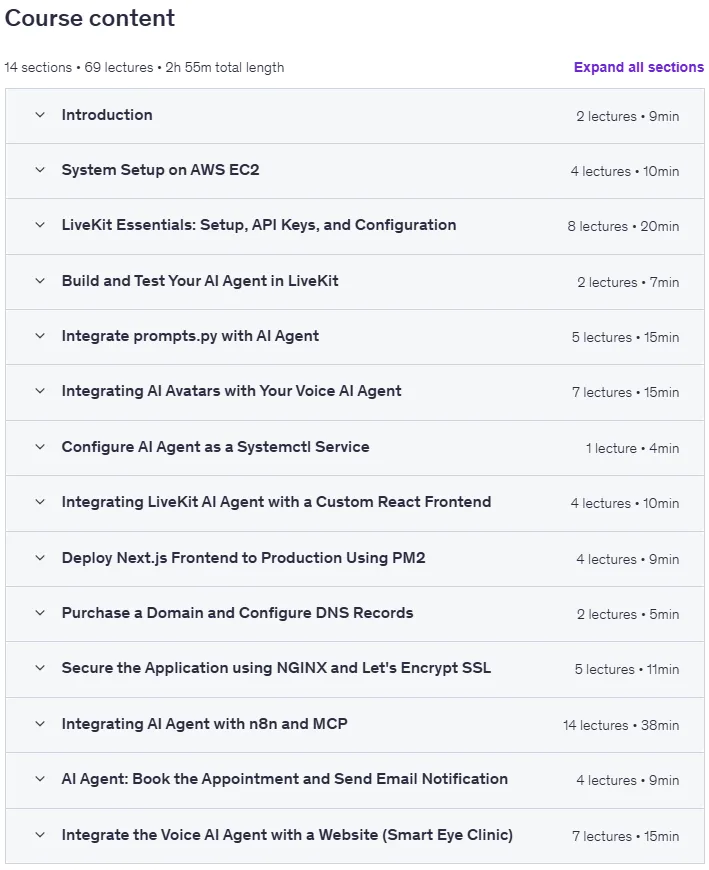
Full-Stack Voice AI Agent with LiveKit, n8n and MCP on AWS is a course combining LiveKit for real-time voice interaction, n8n for workflow automation, and MCP for connecting AI models, published by Udemy Online Academy. This course teaches you how to build a fully functional, production-ready voice AI agent by combining LiveKit for real-time voice interaction, n8n for workflow automation, and MCP (Model Context Protocol) for connecting AI models with external tools. You will learn how to set up cloud infrastructure on AWS, configure live audio streaming, integrate LLM-based reasoning, and orchestrate agent behaviors through automated pipelines. This course introduces you to backend logic, event management, deployment strategies, and scaling best practices, and gives you hands-on experience with modern voice AI architectures.
You’ll start by setting up and configuring an Ubuntu server on AWS EC2, preparing a Python environment, and integrating LiveKit for real-time communication. Then, you’ll connect your AI agent with n8n for workflow automation and MCP for multi-channel task management – enabling features like voice-based appointment booking, email notifications, and calendar scheduling. By the end of the course, you’ll have a fully functional, secure, and automated voice AI agent deployed in a cloud environment.
What you will learn in Full-Stack Voice AI Agent with LiveKit, n8n and MCP on AWS:
- Build and deploy a full-stack voice AI agent using LiveKit, n8n, and MCP on AWS.
- Set up and configure an Ubuntu server on AWS EC2 for development.
- Create and manage virtual environments for Python projects.
- Integrate LiveKit for real-time voice communication in AI systems.
- Configure and connect OpenAI and Deepgram APIs for voice interaction.
- Build and run the AI agent and test it via the LiveKit Playground.
- Integrate prompts.py with the AI agent to control tasks and sessions.
- Add and test AI avatars using Tavus for realistic voice experiences.
- Build and deploy a React/Next.js UI and connect it to the backend.
- And…
Course specifications
Publisher: Udemy
Instructors: Shikhar Verma
Language: English
Level: Introductory to Advanced
Number of Lessons: 63
Duration: 2 hours and 41 minutes
Course topics on 2025/11

Full-Stack Voice AI Agent with LiveKit, n8n and MCP on AWS Prerequisites
Basic understanding of Python programming and command-line usage.
A free or paid AWS account to create and manage EC2 instances.
Basic knowledge of AI tools or APIs like OpenAI and Deepgram (optional).
Enthusiasm to learn, explore, and build a real-time Voice AI system from scratch — beginners are welcome!
Pictures

Full-Stack Voice AI Agent with LiveKit, n8n and MCP on AWS introduction video
Installation guide
After Extract, watch with your favorite Player.
Subtitle: None
Quality: 720p
Downloadly link
Rapidgator link
File password (s): www.downloadly.ir
Size
1 GB