Description
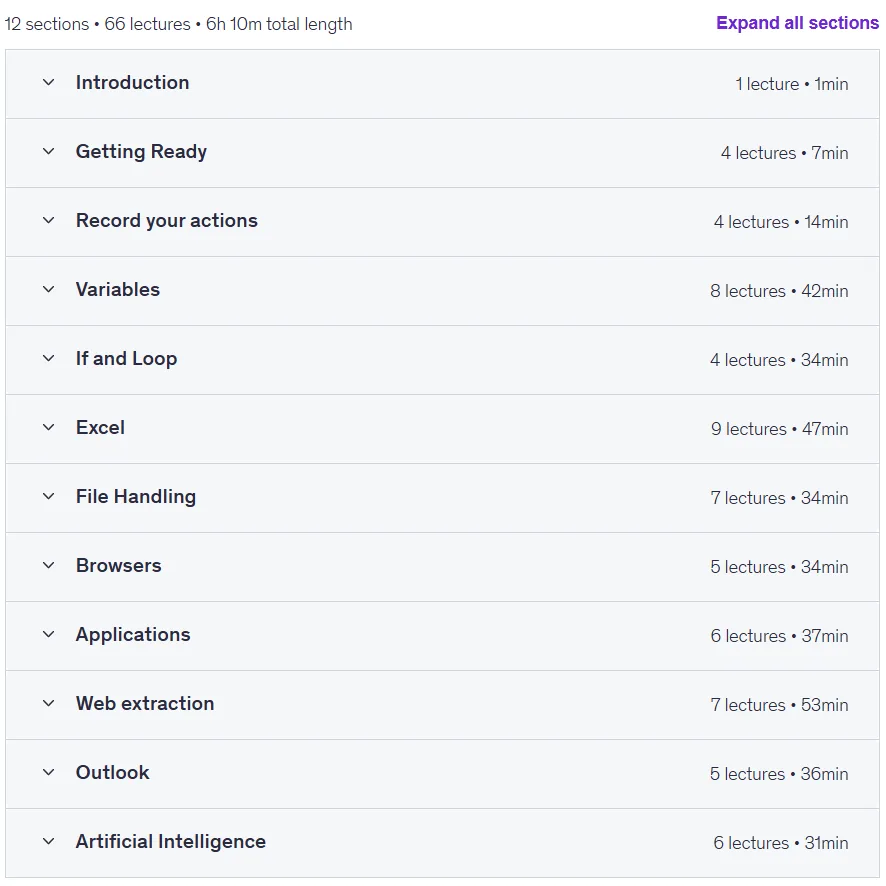
Learn Power Automate Desktop: A Complete Beginner’s Course. Designed for beginners, this comprehensive course teaches you step-by-step how to build automation workflows using Microsoft Power Automate Desktop. The course begins with an introduction to the tool and introduces you to the essential tools and techniques for creating effective and functional workflows. Through hands-on tutorials, you’ll learn how to automate repetitive tasks, manage data, and follow industry best practices. The course content includes 12 practical scenarios and 60 lessons that cover a wide range of topics. You’ll start with the basics of automation, working with variables and conditional logic, and gradually move on to building more complex workflows for managing files and emails, performing operations in Excel, and extracting data from web pages. You’ll also learn how to handle errors, validate inputs, and effectively structure workflows to ensure their efficiency and reliability. By the end of this course, you’ll have a strong foundation in Power Automate Desktop and the confidence to automate everyday office tasks or start a career in RPA (Robotic Process Automation) development.
What you will learn
- Building workflows:
- Learn to build automation workflows in Power Automate Desktop from scratch.
- Variables and logic:
- Understand how to use variables, loops, and error handling to build robust automations.
- Use variables, conditions, and loops to create dynamic workflows.
- Specialized automation:
- Automate tasks with Excel, PDFs, and Outlook to streamline everyday processes.
- Set up automations for file management, Excel, and PDFs.
- Web and data automation:
- Mastery of web automation and data scraping techniques for efficient information extraction and processing.
- Automate web interactions, data extraction, and email processing.
- Workflow Improvement:
- Implement error handling and validation to improve workflow performance.
- Follow best practices to build scalable and easily manageable workflows.
This course is suitable for people who:
- People who are completely new to Power Automate Desktop and want to learn automation step by step.
- Beginners who are curious about building workflows to save time and reduce repetitive tasks.
- Professionals in non-technical roles looking to automate routine tasks and improve productivity.
- Students or newcomers to RPA who want to learn basic automation skills.
Course details
- Publisher: Udemy
- Instructor: Anders Jensen
- Training level: Beginner to advanced
- Training duration: 6 hours and 10 minutes
- Number of lessons: 66
Course topics

Prerequisites for the Learn Power Automate Desktop: A Complete Beginner’s Course
- No prior experience with Power Automate Desktop or RPA tools is needed
- Basic familiarity with Windows and commonly used applications like Excel is helpful but not required
- Access to a Windows PC
- A willingness to learn automation concepts and follow step-by-step instructions
Course images
Sample course video
Installation Guide
After Extract, view with your favorite player.
Subtitles: English
Quality: 720p
Download link
Downloadly
Rapidgator link
File(s) password: www.downloadly.ir
File size
7.06 GB