Description
Learn Obsidian from Scratch Course. This comprehensive course teaches you how to use the powerful Obsidian knowledge management software from beginner to advanced in a completely hands-on manner. As the first course in this series, it covers the basics of using this free and open source tool for flexible and effective knowledge organization. The course begins with an introduction to general features and then moves on to creating and managing notes and documents. You will learn key concepts such as linking notes, installing and using plugins, and the principles of proper note-taking. This step-by-step tutorial covers all the main aspects of the software, providing practical tips and practical examples, and at the end, you will have a complete understanding of how to effectively use Obsidian to monitor personal knowledge and increase your daily productivity, turning you into a proficient and professional user.
What you will learn
- Getting to know Obsidian:
- Introduction to Obsidian and its concept.
- How to install Obsidian.
- Getting to know the settings in Obsidian.
- Create and organize notes:
- How to create notes in Obsidian.
- How to format text in Obsidian.
- How to create folders and organize notes in Obsidian.
- How to create notes and link them together.
- How to add images and attachments to notes.
- Advanced features and tools:
- What is Graph view and why is it important to know it?
- How to use Graph view.
- How to create custom shortcuts in Obsidian.
- What are Community plugins and how to choose them.
- How to use the Daily notes plugin correctly.
- How to create personal templates and use them daily.
- How to use the Make md plugin (similar to Notion but inside Obsidian).
- How to create presentations within Obsidian.
- How to add emojis to notes.
- How to create graphs and charts in Notes.
- Output:
- How to export notes as PDF.
This course is suitable for people who:
- People who want to learn Obsidian.
- People who want to learn different note-taking methods.
- People who want to improve their productivity using Obsidian.
Course details
- Publisher: Udemy
- Instructor: Fahad Masood Reda
- Training level: Beginner to advanced
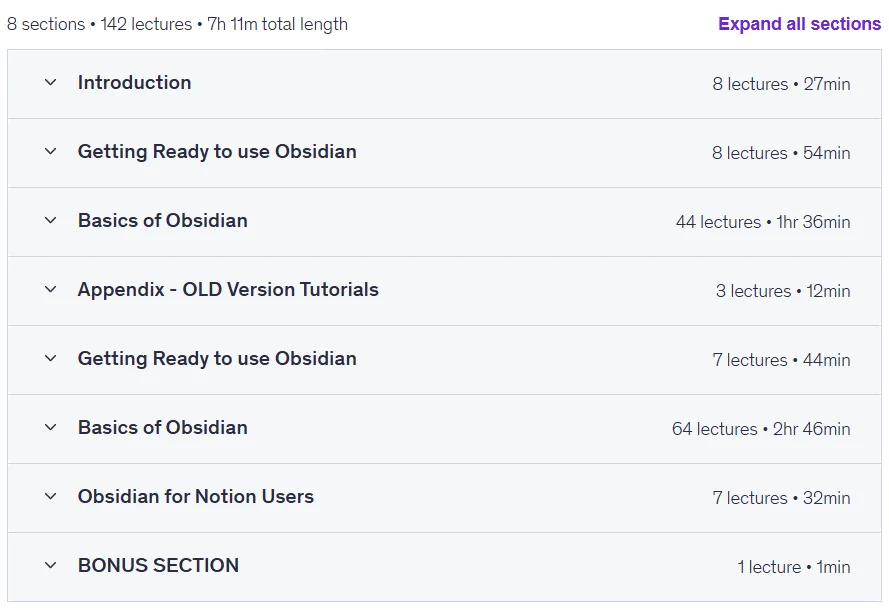
- Training duration: 7 hours and 11 minutes
- Number of lessons: 142
Course topics

Prerequisites for the Learn Obsidian from Scratch course
- You need to have an Internet connection to download the software
- Obsidian is available on Windows and Mac and Linux (this course is using Windows 10)
- This course is using the Free version of Obsidian (the Personal use version)
Course images
Sample course video
Installation Guide
After Extract, view with your favorite player.
Subtitles: English
Quality: 720p
Download link
Downloadly
Rapidgator link
File(s) password: www.downloadly.ir
File size
2.1 GB