Descriptions
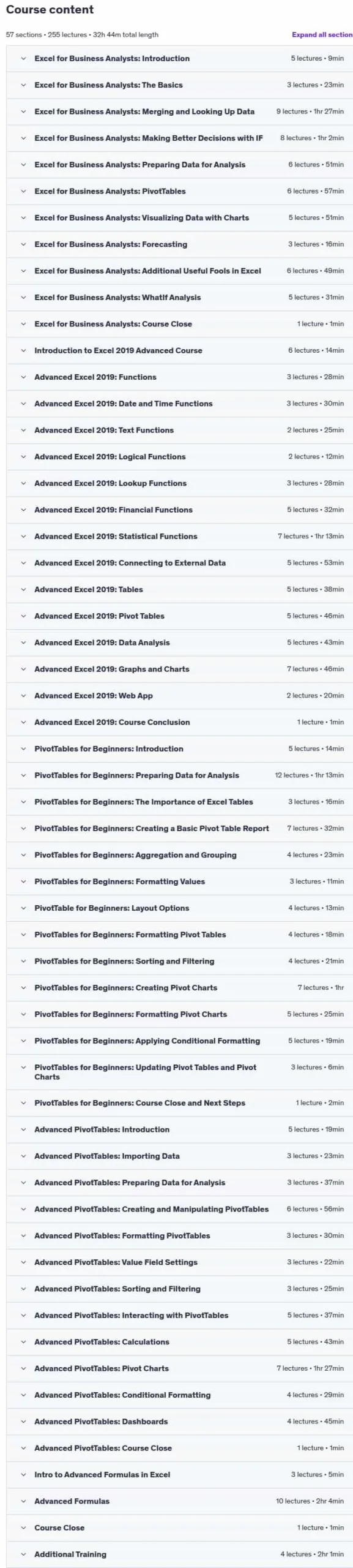
The Microsoft Excel Data Analysis Toolkit Bundle, This course bundle includes practice exercises and teaches you the essential data analysis skills needed to thrive in the modern workforce. Data analysis is easier than you might think – you don’t need to code or understand algorithms, just master Microsoft Excel techniques. This comprehensive five-course bundle combines in-depth training on business analytics, advanced Excel 2019 features, data analysis techniques, dashboard creation, and power user tools. You’ll learn how to merge data from different sources using VLOOKUP, HLOOKUP, INDEX MATCH, and XLOOKUP, apply logic with IF, IFS, IFERROR, SUMIF, and COUNTIF, split and clean data with text functions, create PivotTables and Pivot Charts, forecast with Forecast Sheets, and use Conditional Formatting to highlight key data points.
The bundle covers advanced charting and graphing, detailed formatting tools, Power Query, advanced functions like SUMPRODUCT and LINEST, automated reporting, dynamic named ranges, and data import/export. You’ll master dashboard creation with PivotTables, 3D Maps, and advanced sorting/filtering. Additionally, you’ll learn to create multi-dependent dynamic drop-down lists, perform 2-way lookups, automate tasks with Macros and VBA programming, and use What-If Analysis tools like Goal Seek, Scenario Manager, and Solver. By completing this extensive training, you’ll gain expertise in financial and statistical functions, sparklines, data bars, histograms, regression analysis, and building interactive dashboards that transform raw data into actionable business insights.
What you’ll learn
- How to merge data from different sources using VLOOKUP, HLOOKUP, INDEX MATCH, and XLOOKUP
- How to use IF, IFS, IFERROR, SUMIF, and COUNTIF to apply logic to your analysis
- How to split data using text functions SEARCH, LEFT, RIGHT, MID
- How to standardize and clean data ready for analysis in Excel
- Conducting a Linear Forecast and Forecast Smoothing in Excel
- All about Histograms and Regression in Excel
- How to use Goal Seek, Scenario Manager, and Solver to fill data gaps in Excel
- Averages, percentiles, and LINEST functions
- Sparklines and data bars
- Importing data from other data sources
- Advanced data analysis techniques
- Financial & Statistical Functions
- How to create amazing looking dashboards using Pivot Tables
- How to format a PivotTable, including adjusting styles
- Advanced Sorting and Filtering in PivotTables
- How to use 3D Maps from a PivotTable
- How to update your data in a PivotTable and Pivot Chart
- Create multi-dependent dynamic drop-down lists in Excel
- Perform a 2-way lookup in Excel
- Automate repetitive tasks in Excel using Macros
- How to edit Macros in the VBA Editor
- How to write your own macro from scratch
Who this course is for
- Those wanting to automate Excel task or procedures.
- Users with basic knowledge of Excel 2019/365 and those upgrading from previous software versions
- Users who have a foundation of Microsoft Excel and seeking to advance their Excel 2019/365 knowledge.
Specificatoin of The Microsoft Excel Data Analysis Toolkit Bundle
- Publisher : Udemy
- Teacher : Simon Sez IT
- Language : English
- Level : Intermediate
- Number of Course : 255
- Duration : 32 hours and 44 minutes
Content of The Microsoft Excel Data Analysis Toolkit Bundle

Requirements
- Microsoft Excel for Windows. The course was created using Excel 2019/365 for Windows. All of the code used in this course except for one property is compatible for Excel 2007, Excel 2010, Excel 2013, Excel 2016 and Excel 2019.
- Intermediate knowledge of Microsoft Excel.
Pictures

Sample Clip
Installation Guide
Extract the files and watch with your favorite player
Subtitle : English
Quality: 720
Download Links
Downloadly
Rapidgator
Password file(s): www.downloadly.ir
File size
15.48 GB