Descriptions
Linux & Unix Fundamentals with WSL, This comprehensive course helps you learn the foundational concepts of Linux and Unix using Windows Subsystem for Linux (WSL), without needing dual boot setups or virtual machines. If you’re a Windows user who needs Linux skills for your job but prefers to stay in a familiar environment, this course is the perfect solution. You’ll learn essential Linux concepts, basic commands, system management, and integration with development tools like Visual Studio Code — all directly on your Windows system. The course offers a real Linux experience within Windows and equips you with practical, real-world skills.You’ll cover installing and configuring WSL, navigating the Linux file system, managing users, setting permissions, securing the system, and using advanced commands like pipes and redirection. It also teaches Bash fundamentals including variables, arrays, conditionals, and functions for task automation. This course is designed for web developers, DevOps professionals, data analysts, and tech enthusiasts who want to build Linux skills alongside their Windows workflow. By the end, you’ll be confident working in Linux environments, automating tasks, and pursuing new career opportunities.
What you’ll learn
- Install and configure WSL on Windows systems and set up multiple Linux distributions for development work
- Navigate the Linux file system confidently using essential commands like ls, cd, pwd, and understand directory structures
- Create, modify, and manage files and directories using touch, mkdir, cp, mv, rm, and rmdir commands effectively
- Master Linux user account management by creating, modifying, deleting user accounts and understanding different user types
- Configure user groups and permissions to implement proper security practices in multi-user Linux environments
- Understand and modify Linux file permissions using both symbolic and numeric notation for files and directories
- Install, update, and manage software packages using Linux package managers and repository systems
- Use advanced command-line features including pipes, redirection operators, and command chaining for efficient workflows
- Search and filter data effectively using grep and other text processing tools to find specific information
- Access system documentation using the man command and other help resources to become self-sufficient
- Integrate Visual Studio Code with WSL for seamless development workflows between Windows and Linux environments
- Write and execute basic Bash commands and understand shell fundamentals for automation tasks
- Work with Bash variables and arrays to store and manipulate data in shell environments
- Implement conditional statements and functions in Bash to create logical decision-making scripts
- Apply Linux security best practices including password policies, account locking, and user access control
- Troubleshoot common WSL and Linux issues independently using command-line tools and system resources
Who this course is for
- Computer science or IT students who need Linux skills for coursework or internships
- Recent graduates preparing for entry-level tech positions
- Anyone studying for Linux certifications or technical interviews
- Web developers who need to understand server environments and deployment
- IT support specialists expanding into system administration
- DevOps beginners preparing for cloud and infrastructure roles
- Data analysts who need command-line skills for data processing
- Cybersecurity professionals requiring Linux knowledge for security tools
- Professionals from non-tech fields transitioning into technology careers
- Windows administrators wanting to understand Linux server environments
- Anyone whose job increasingly requires working with cloud platforms (AWS, Azure, Google Cloud)
- Tech enthusiasts curious about how most web servers and internet infrastructure operates
- Home users wanting to understand the operating system that powers Android phones and smart devices
- Anyone interested in open-source technology and want to start with a solid foundation
Specificatoin of Linux & Unix Fundamentals with WSL
- Publisher : Udemy
- Teacher : Bluelime Learning Solutions
- Language : English
- Level : Beginner
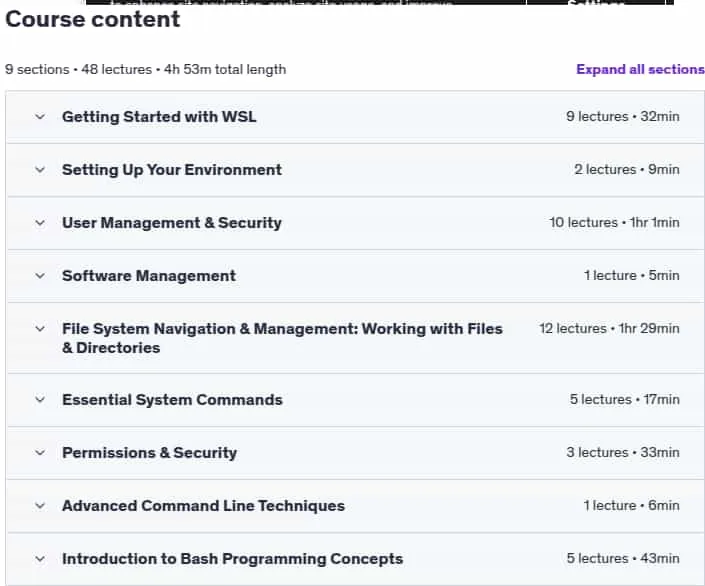
- Number of Course : 48
- Duration : 4 hours and 53 minutes
Content of Linux & Unix Fundamentals with WSL

Requirements
- Basic computer skills: Ability to navigate files and folders, install software, and use a web browser
- Willingness to learn: Open mindset to try new commands and concepts
- Windows 10 or Windows 11: Any edition (Home, Pro, Enterprise, or Education)
- Windows computer with at least 4GB RAM (8GB recommended for smoother performance)
- Internet connection for downloading WSL, Linux distributions, and Visual Studio Code
- Administrator access on your Windows machine to install WSL and software
Pictures

Sample Clip
Installation Guide
Extract the files and watch with your favorite player
Subtitle : Not Available
Quality: 720p
Download Links
Password file(s): www.downloadly.ir
File size
975 MB